Study AI


The challenge
Preparing for exams like JAMB, WAEC, and NECO can be overwhelming. Students face three major pain points:
Lack of Personalization:
Most study tools treat every learner the same, regardless of strengths or weaknesses.Low Motivation & Poor Engagement:
Studying alone can feel isolating and boring, especially for teens who crave connection and progress.Limited School Tools:
Institutions that prepare students in bulk struggle to track performance or distribute access easily.
The challenge was clear, to create a single ecosystem that personalizes the learning experience for individual students while also serving schools and organizations at scale.

Research & Insights
Before any design work began, I collaborated with the product team to conduct informal interviews with students, teachers, and education center owners.
Here’s what we found:
Students wanted less text, more visual progress cues, and a sense of achievement.
Schools needed a structured way to manage student access and measure outcomes.
Parents wanted reassurance that the time spent on devices was actually productive.
From these insights, three design principles emerged:
Make it effortless to start.
Visualize progress clearly.
Motivate consistency through community and rewards.
The solution
After identifying the major gaps students faced: lack of personalization, poor motivation, and scattered study tools. I set out to design a unified web platform that simplifies exam preparation while making learning feel rewarding.
The goal wasn’t just to build another practice app but to create an intelligent learning ecosystem, one that adapts to each student’s needs, keeps them engaged, and supports schools that guide them.
The result was StudyAI, a platform powered by artificial intelligence and human-centered design, built around experiences that work seamlessly together to transform how students learn:

1. Onboarding
I designed a conversational, goal-oriented onboarding flow that helps users quickly choose their exam, subjects, and target goals. It feels light, interactive, and human, setting the right tone from the very first screen.
Several iterations were made for this flow and tested with a selected number of users on the team. This was really helpful, as it enabled me to get instant feedback on features and design choices.


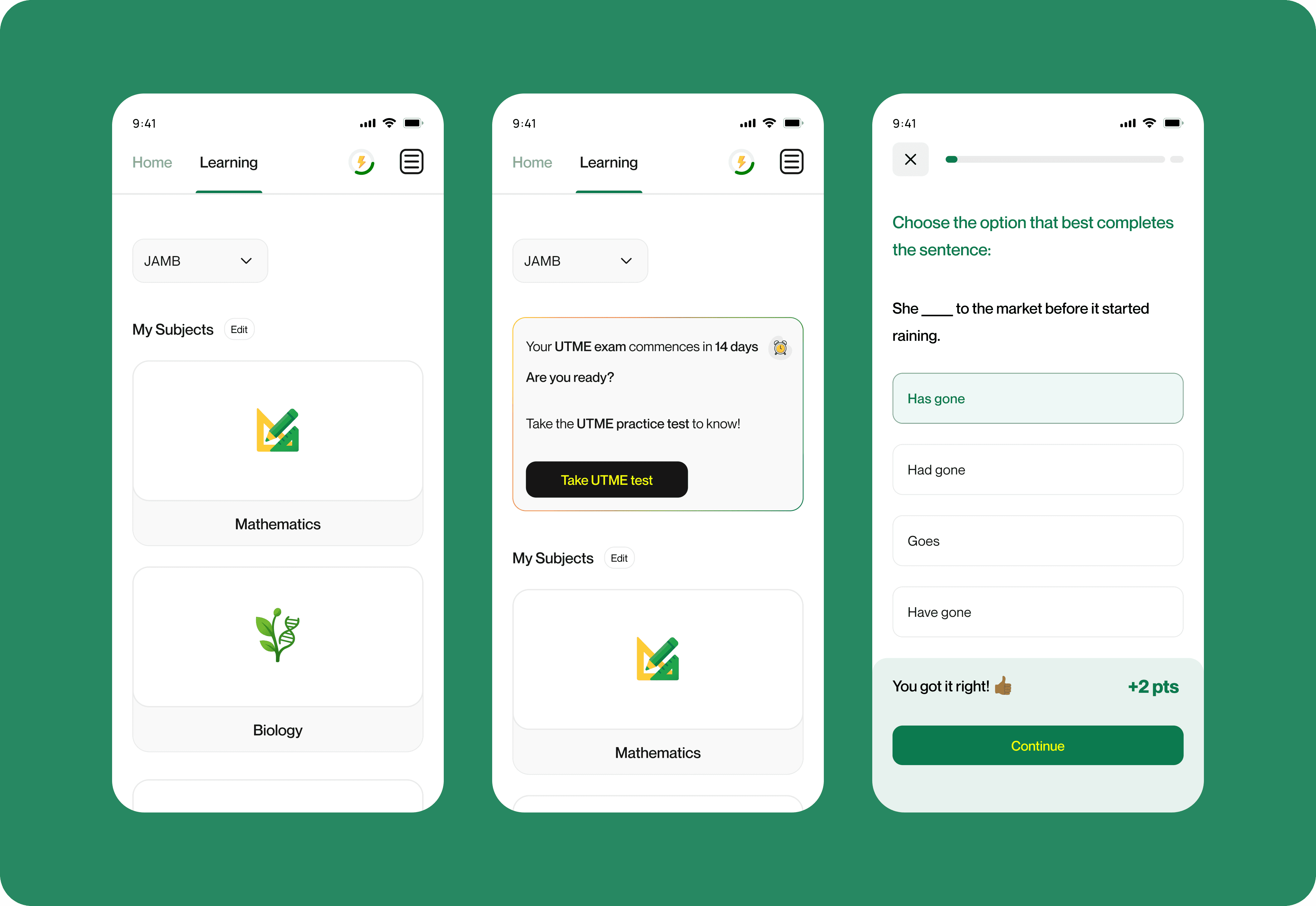
2. Student Dashboard
The student dashboard acts as the control center of the entire experience.
From here, learners can track their overall performance, see progress across subjects, and access quick links to continue studying.
I designed it to visually communicate achievement, progress , and milestone badges. It solves the problem of disconnected study sessions by giving students a single space to measure growth and stay consistent.


3. Learning Map
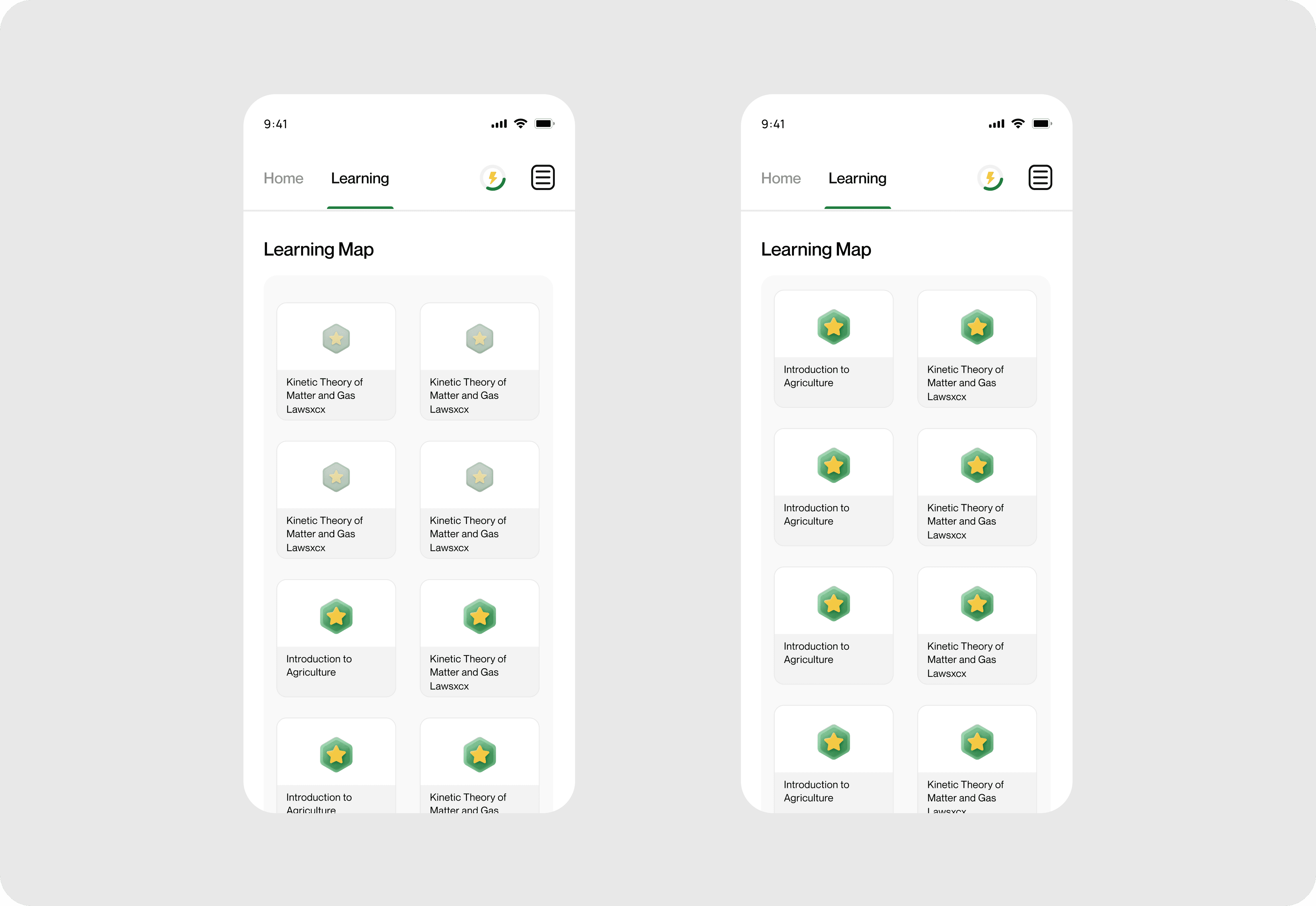
This was one of the most distinctive features in StudyAI.
Instead of traditional lists, each topic appears as a cone or cube that fills up with color as students progress. It provides a visual of how far they’ve gone. The system solves the problem of invisible progress that often demotivates learners.

4. Community
The community section allows students to interact, share insights, and motivate one another.
It includes discussion threads, tips from top performers, and challenge boards.
The idea was strenghtened by students who said studying alone felt isolating, so this feature builds a sense of belonging and encourages accountability. It makes learning a shared experience, not just a solo effort.


5. Leaderboard & Achievement
This feature gamifies progress, rewarding consistency, accuracy, and participation.
Students can see where they stand among peers and earn badges for milestones. It was designed to make competition a form of motivation.

6. Organization Dashboard
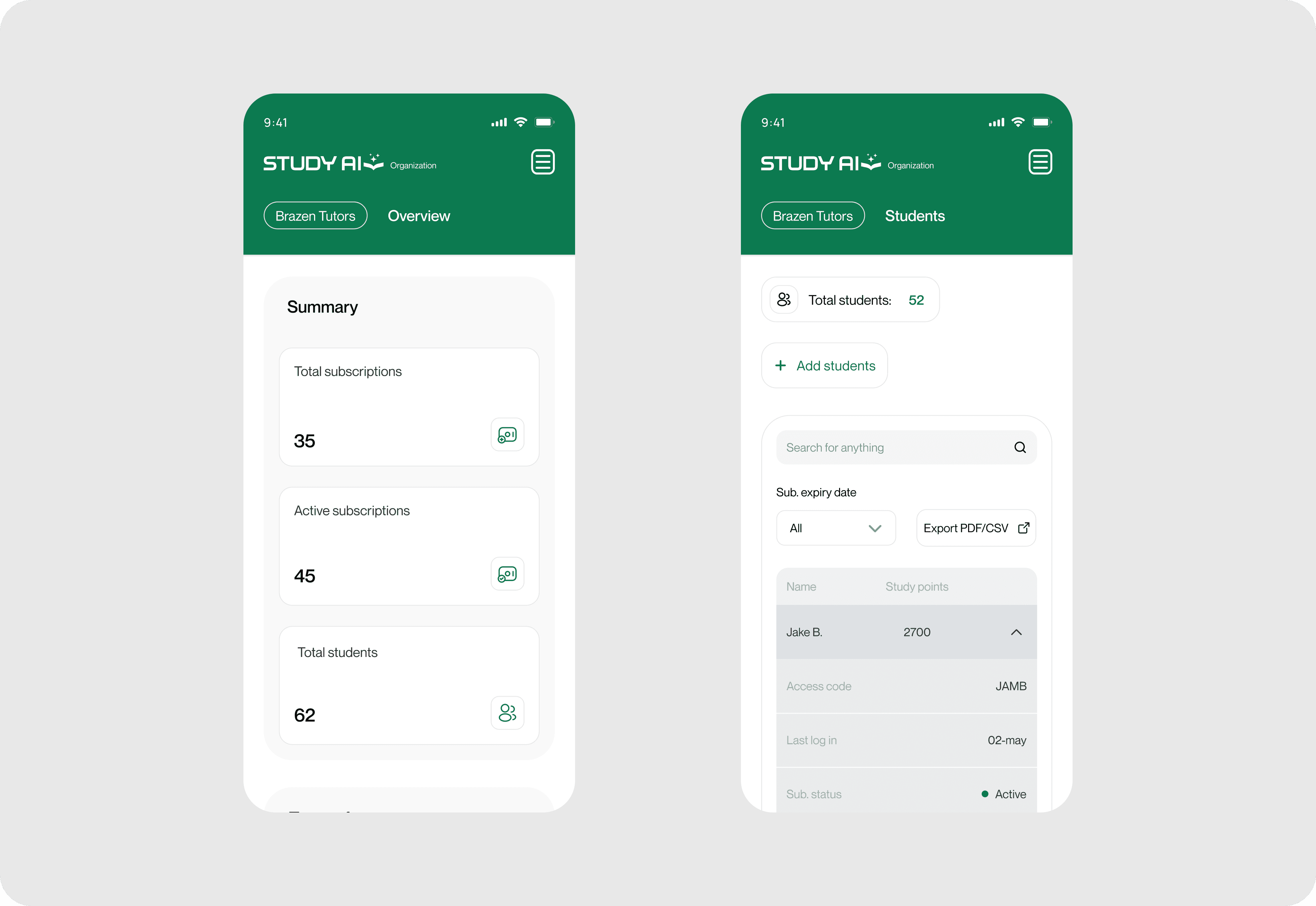
Designed for schools and educational partners, this admin panel allows organizations to purchase bulk access codes, assign them to students, and monitor progress in real time.
It solves a crucial problem for institutions that previously had no centralized visibility into student performance. With visual analytics and simple management tools, organizations can now measure impact and guide their students more effectively.


6. AI Chat
The AI Chat feature, fine-tuned with each subject's official content/textbook, is like having a personal tutor available 24/7. Students can ask questions about any topic, request explanations, or even get step-by-step help solving practice questions.
Unlike static study apps, the AI responds contextually, adapting to the student’s learning style and pace.
This feature was designed to solve one of the biggest pain points we heard during interviews:
“When I get stuck on a question, I have no one to ask.”
By integrating conversational AI directly into the app, we made it possible for students to get instant feedback and guidance without leaving their study flow.
It helps learners build confidence, understand concepts deeply, and study smarter.


Learning & Reflection
Design and Development Thrive on Communication:
Since I also served as the project manager, I sat at the center of design, product, and development. And if there’s one thing that kept the project on track, it was consistent communication.
Weekly check-ins, Figma-to-code walkthroughs, and clear documentation in Jira made all the difference.
Testing Design Decisions
One of the biggest advantages of our process was testing key design flows, like onboarding, quiz navigation, and the learning map before development began.
We ran small usability tests with real students that were on the team, observing where they hesitated or got confused. Those sessions often revealed issues we didn’t see on the Figma screen things like unclear labels, too many taps, or misaligned expectations.
Testing early meant we could fix problems before they became expensive to implement.
That process reinforced a core truth for me: design assumptions are best validated by real users, not designers.
Collaboration Makes or Breaks a Product
As both designer and project manager, I found myself bridging communication between design and development daily.
Clear documentation, Jira task organization, and weekly syncs made handoffs seamless and kept everyone aligned.
Understanding context
Designing for Nigerian students meant considering realities like unstable internet, shared devices, and high exam anxiety. We optimized the platform to load quickly, reduced text complexity, and made visuals the main communication tool.